
How to Write Claude Code Skills That Actually Trigger
July 19, 2026
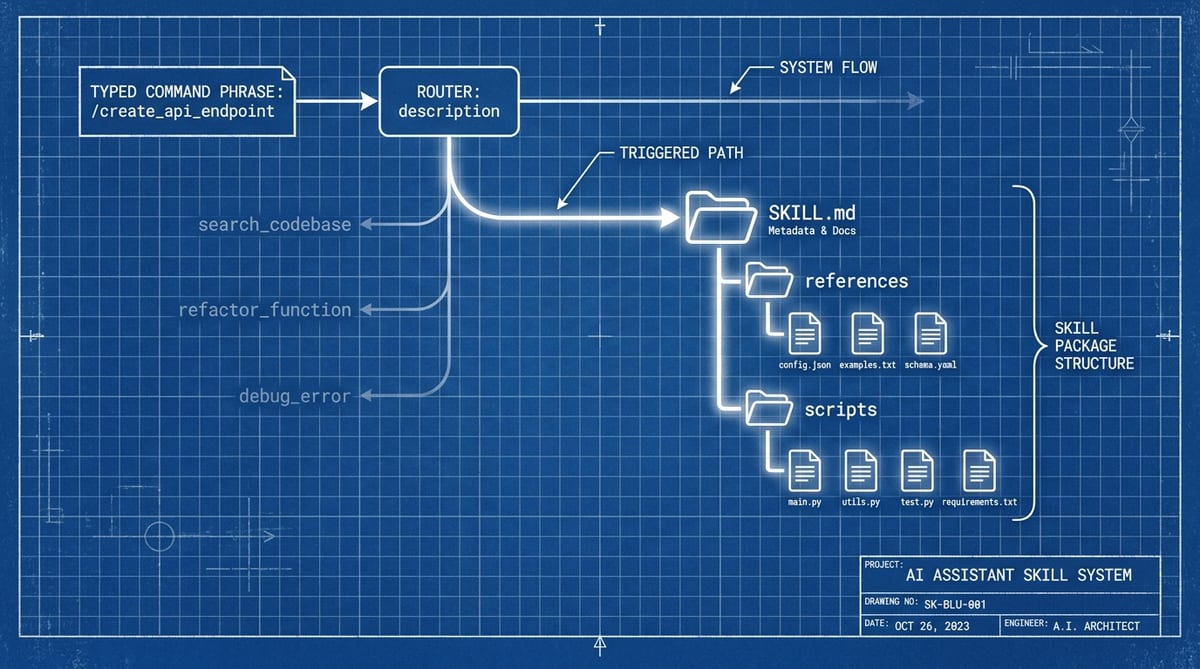
To write Claude Code skills that fire reliably, treat the description field as a trigger router, keep SKILL.md lean with progressive disclosure, gate side effects with disable-model-invocation, and test triggering in fresh sessions. Most skills fail for one reason: the description reads like documentation instead of matching what you actually type.
Why Most Skills Fail: The Description Is a Router#
Claude never reads a skill's body when deciding whether to use it. It reads one thing, the description in your frontmatter, and fuzzy-matches it against the task at hand. The official skills docs put it plainly: "What the skill does and when to use it. Claude uses this to decide when to apply the skill."
Triggering happens two ways: you type the skill name as a slash command, or Claude matches your request against the description on its own. The second path is the one that breaks, and it breaks silently. No error, no log line, just a skill that never loads.
So your Claude skill description is a trigger router, not documentation. If a "claude skill not triggering" search brought you here, the description is the first thing to check and the most common fixable cause, with listing-budget eviction as the other frequent offender.
---
name: pdf-helper
description: A collection of utilities and best practices for working with PDF documents.
------
name: pdf-helper
description: Extract form fields, fill forms, redact text, or parse tables
from PDF files. Use when the user asks to fill, redact, or parse a PDF,
or mentions form fields, AcroForms, or PDF extraction.
---The fixed version leads with verbs and the phrases a user would actually type. Order matters, because combined description text gets truncated at 1,536 characters in the skill listing. Key use case first, background never.
There's also a listing budget most authors don't know exists. Skill descriptions share a pool that scales at 1% of the model's context window, and on overflow Claude Code drops descriptions "starting with the skills you invoke least." Your least-used skill silently loses its trigger keywords first.
Where one user's 16,000-token skill listing footprint came from
The numbers get ugly fast. One user's /context report in issue #39686 showed 16,000 tokens of skill listings, with roughly 5,970 of those (3,950 from claude.ai skills, 2,020 from Cowork plugins) injected without the user ever asking. Skill listings stack on top of every other cost in my token-usage teardown.
Tip: Raise the pool withskillListingBudgetFraction, or mark a rarely-typed skill"name-only"in skillOverrides so it costs one name instead of a paragraph.
The Evidence: Curated Skills Work, Lazy Skills Don't#
SkillsBench, an arXiv benchmark published in February 2026, ran 87 tasks across 18 model-harness configurations with and without curated skills. Average pass rate went from 33.9% to 50.5%, a 16.6-point lift. It's the strongest evidence yet that skills reward craft, with one honest caveat: a single benchmark, 87 tasks, and skills curated by the evaluators themselves, so treat the direction as solid and the magnitudes as provisional.
| Category | Without skills | With curated skills | |
|---|---|---|---|
| Healthcare | 34.2% | 86.1% | |
| Manufacturing | 1% | 42.9% | |
| Cybersecurity | 20.8% | 44% | |
| Natural Science | 23.1% | 44.9% | |
| Energy | 29.5% | 47.5% | |
| Office & White Collar | 24.7% | 42.5% | |
| Finance | 12.5% | 27.6% | |
| Media & Content Production | 23.8% | 37.6% | |
| Robotics | 20% | 27% | |
| Mathematics | 41.3% | 47.3% | |
| Software Engineering | 34.4% | 38.9% |
Look at the spread, though. Healthcare jumped from 34.2% to 86.1% with skills and manufacturing went from 1.0% to 42.9%, while software engineering came dead last at 4.5 points of gain. Skills pay off most where the model lacks the procedure, and your team's weird deploy ritual is exactly that kind of procedure.
One finding should change how you write Claude Code skills: self-generated ones provide "negligible or negative benefit on average." The authors conclude models "cannot reliably author the procedural knowledge they benefit from consuming." So "just ask Claude to write the skill for you" is the lazy path the data says doesn't work.
This doesn't mean skip Claude during drafting. It means the human editing pass is where the value gets created.
Structure for Progressive Disclosure#
The SKILL.md format is built around progressive disclosure, three levels of loading that keep idle context cost near zero. Anthropic's engineering post frames it as metadata first, full instructions on activation, then linked files Claude discovers "only as needed."
Progressive disclosure: what loads into context, and when
Level 1 is one name-plus-description line in the system prompt, paid in every session. Level 2, the SKILL.md body, loads only when the task matches the description. Level 3 files never enter context unless Claude decides it needs them.
That first level is the same listing budget from the previous section, which is why a tight description helps twice. It routes better and it costs less.
pdf-form-filler/
├── SKILL.md            # under 500 lines, imperative steps
├── references/
│   └── field-types.md  # deep docs, loaded only on demand
├── scripts/
│   └── fill_form.py    # executed via Bash, never read into context
└── assets/
    └── template.pdf    # copied into place, not read
The docs' rule is blunt: keep SKILL.md under 500 lines and move deep reference material into references/. SkillsBench confirms it independently, finding that compact, detailed skills beat sprawling ones and that two to three modules is the sweet spot.
Deterministic work belongs in scripts/. Anthropic's line: "Sorting a list via token generation is far more expensive than simply running a sorting algorithm." A script also runs the same way every time, which is the real fix for a skill Claude follows inconsistently.
A Worked Example: A Project-Scoped Skill#
The strongest skills are project-scoped, not global. I spent weeks building skills in ~/.claude/skills/ before the obvious problem hit: my React project uses Formik and my Next.js project uses React Hook Form, and one global "generate a form" skill cannot serve both without awkward conditionals. A skill committed to .claude/skills/ inside the repo encodes your component APIs, import paths, and validation library, and every teammate who pulls the branch gets identical output. No more "what was that prompt you used for forms?" in Slack.
Here is a /generate-form skill that reads your existing FormBuilder component and scaffolds forms matching your conventions. Create the directory and write the body:
mkdir -p .claude/skills/generate-form---
description: "Generate a form component using our FormBuilder API"
---
# Generate Form
Create a new form component following project conventions.
## Instructions
1. Read `src/components/ui/FormBuilder.tsx` to understand the current API.
2. Accept a form name and field definitions from the user.
3. Generate the form component in `src/components/forms/{FormName}Form.tsx`.
4. Include Zod validation schema in `src/components/forms/{FormName}Form.schema.ts`.
5. Add a Vitest test file in `src/components/forms/__tests__/{FormName}Form.test.tsx`.
## Conventions
- Use `useForm` from our FormBuilder, not raw React Hook Form.
- Field names are camelCase. Labels are auto-generated from field names.
- Every form gets a loading state and error boundary.
- Export the form as a named export, not default.
## Template
// src/components/forms/{FormName}Form.tsx
import { useForm, FormBuilder, Field } from '@/components/ui/FormBuilder';
import { {formName}Schema } from './{FormName}Form.schema';
export function {FormName}Form({ onSubmit }) {
const form = useForm({
schema: {formName}Schema,
defaultValues: {/* generated from fields */},
});
return (
<FormBuilder form={form} onSubmit={onSubmit}>
{/* Fields generated here */}
</FormBuilder>
);
}That body does two things a CLAUDE.md rule cannot: it reads your actual component source at run time, and it carries the exact template with your project's import paths. One developer replaced their entire Plop.js generator with a single skill like this, and their takeaway is the reason project-scoped skills win: "templates are more powerful than rules" because a skill loads the template explicitly instead of hoping Claude remembers it from context.
Now, instead of retyping a paragraph about your API, file naming, and validation library every session, you type one line:
/generate-form ContactForm: name (string, required), email (email, required), message (textarea)Claude reads the skill, checks your real FormBuilder source, and emits the component, its Zod schema, and a matching test file, with correct imports in the right directory every time. The deterministic parts (file layout, boilerplate) live in the template where they run the same way each time; only the shape of this form is generated. That is the same scripts/ over token-generation principle from the previous section, applied to the template.
Do not build a library of twenty skills on day one. Find the single prompt you retype most (form generation, endpoint scaffolding, test files) and encode just that one, then commit the directory so your team gets it for free. Skills are not about being clever with the model; they are about being lazy in the right way: encode the pattern once, run it forever.
Frontmatter That Controls Invocation#
Most tutorials stop at name and description. The fields that decide who invokes a skill, and in which context it runs, are the ones that separate a working skill from a liability. Three are worth knowing cold.
Gate Side Effects With disable-model-invocation#
Set disable-model-invocation: true on anything that deploys, commits, releases, or messages other humans. The docs' own example is the right nightmare: you don't want Claude deciding to deploy because your code looks ready. The skill stays available to you as /deploy, but Claude can never fire it on its own.
---
name: deploy
description: Deploy the current branch to staging or production
disable-model-invocation: true  # only a human /deploy runs this
argument-hint: [staging|production]
---

Validate that $ARGUMENTS is staging or production and stop if it is neither,
run scripts/preflight.sh against that target, then execute scripts/deploy.sh
with the validated target.
Fork Context for Task-Shaped Skills#
context: fork runs the skill body as a subagent prompt in a lean context that skips CLAUDE.md and your git status. Pair it with an agent field to choose which subagent definition executes it. Your main session gets the result back without paying for the intermediate work, which is why it suits read-only, task-shaped skills like a codebase audit and not the deploy above (a fork can't stop to confirm anything with you).
Warning: context: fork only makes sense for skills with explicit instructions. A guideline-only skill ("prefer functional style") forked into a subagent has no task to execute and returns nothing useful.Take Arguments With argument-hint#
argument-hint: [issue-number] shows up in slash-command autocomplete, and $ARGUMENTS expands to everything typed after the command, with $0 and $1 available for positional access. Custom commands are skills now: a file at .claude/commands/deploy.md creates /deploy the same way a deploy skill does.
---
name: fix-issue
description: Fetch a GitHub issue, reproduce it, and implement a fix.
  Use when the user references an issue number to fix.
argument-hint: [issue-number]
disable-model-invocation: true
---

Run gh issue view $ARGUMENTS, reproduce the failure locally,
implement the fix, and reference the issue in the commit message.
The disable-model-invocation: true line is load-bearing here: $ARGUMENTS is only populated on slash invocation, so an argument-shaped skill should be slash-only.
The same fields turn a skill into a repeatable micro-command: a checklist or workflow you trigger by name, with every authoring rule here applying unchanged. The project-scoped skill above is one worked shape; command-shaped skills are another.
Skill, MCP Server, CLAUDE.md, or Subagent?#
The skills vs MCP question dominates the Hacker News thread on the launch, alongside variants like "Isn't this the same as Cursor Rules?" Fair confusion, since all four mechanisms put words into Claude's context. They differ in when, and at what cost.
| Criterion | Skill | MCP server | CLAUDE.md | Subagent |
|---|---|---|---|---|
| Loads only when needed | ● | ◐ | ○ | ● |
| Carries step-by-step procedure | ● | ○ | ◐ | ◐ |
| Reaches external systems with auth | ◐ | ● | ○ | ◐ |
| User-invokable as /command | ● | ○ | ○ | ○ |
| Isolates work from main context | ◐ | ○ | ○ | ● |
| Portable across projects and teams | ● | ● | ◐ | ◐ |
- MCP servers reach external systems. Auth, live APIs, databases. If Claude has to touch something outside the repo, nothing else does the job.
- Skills carry procedure. On-demand instructions and scripts that cost one description line until triggered.
- CLAUDE.md holds always-true facts: build commands, conventions, constraints that apply to every task, loaded every session.
- Subagents isolate work. Big searches and messy subtasks that would otherwise pollute your main context.
None of these are exclusive. A skill can call MCP tools mid-procedure, and a forked skill is literally a subagent running a skill body as its prompt. The triggering lens cuts both ways here: if a skill never fires no matter how you word the description, the procedure probably wants to be a tool or a subagent instead.
My split: one MCP server per external system, then thin skills that orchestrate those tools into a workflow. If a CLAUDE.md block only matters during one kind of task, it's a skill wearing the wrong file. I keep the server list itself short for the same budget reasons, see which MCP servers are worth installing.
Test Skills Like Code#
A skill you've only exercised in the session where you wrote it is untested. That session already has the whole skill in context, so everything triggers and everything gets followed. Fresh sessions are the only honest test environment.
- Open a fresh session and type a task phrase a real user would use, no preamble. Note whether the skill fires.
- Build a phrase matrix: three phrasings that must trigger, two neighboring tasks that must not.
- When a phrase misses, the description is the only lever: the body plays no part in triggering, so editing it fixes nothing.
- Re-run the whole matrix after every description edit, the same way you'd re-run tests.
Anthropic's debugging checklist reduces to one line: check the description includes keywords users would naturally say. When a phrase misses, triage in order: first confirm the description actually made it into the listing (budget eviction is silent), then run the phrase two or three times in fresh sessions, because triggering is probabilistic. A 2-out-of-3 hit on a must-trigger phrase is a fail, and only after both checks should you add keywords.
For drafting, use the loop the engineering post suggests: ask Claude to capture its successful approaches and common mistakes into a skill. Then edit like an owner. SkillsBench showed the unedited draft is worth roughly nothing.
Cut the filler and compress to two or three modules. Then rewrite the description trigger-first, because you write Claude Code skills the way you write tests: adversarially. That editing pass is the difference between curated skills (+16.6pp average) and self-generated ones (roughly nothing).
Before inventing shapes, steal them. obra/superpowers is a 257k-star (as of July 2026) corpus of composed skills with an explicit methodology, and it's the best worked example of everything above.
Claude Code skills: what developers actually ask
A project (or CLAUDE.md) scopes context to one codebase. A skill packages a repeatable procedure you want in every codebase: if you would copy the same instructions into a second project, that is the signal to extract a skill. Personal skills live in ~/.claude/skills and follow you across every repo.
asked on news.ycombinator.com ↗No. Rules files sit in context for the whole session whether they are relevant or not. A skill costs one description line until its trigger matches, then loads its full body. That lets you maintain far more procedural knowledge without paying idle context cost for all of it.
asked on news.ycombinator.com ↗CLAUDE.md is for always-true facts about the project (build commands, conventions, constraints that apply to every task). A skill is for on-demand procedure that only some tasks need. If a block of CLAUDE.md only matters during one kind of task, it belongs in a skill.
asked on news.ycombinator.com ↗Keep the body short and imperative, structure steps as a checklist, and test in fresh sessions rather than the one where you wrote it. For workflows that must run exactly, set disable-model-invocation: true and invoke the skill yourself, or move the deterministic parts into scripts/ so Claude executes code instead of interpreting prose.
asked on news.ycombinator.com ↗Yes, and the pairing changes what the skill can do: context: fork runs the skill body as a subagent prompt, which means it gets a clean context (no CLAUDE.md, no conversation history) and returns only its final result. Pick the agent field to control which tools it gets. Budget bonus: the fork cannot see your conversation, so any input it needs must arrive through arguments.
asked on news.ycombinator.com ↗Next action: open your worst-triggering skill, rewrite its description trigger-first, and run a five-phrase matrix in fresh sessions. Twenty minutes, and you'll know exactly why it wasn't firing.